Deploy Studio app icon

App Store Connect, finally on iPhone

Ship the release. From anywhere.

The release console for developers who would rather not open a Mac just to get an update into the App Store.

iPhone & iPad · Free to use · Your key stays on your device

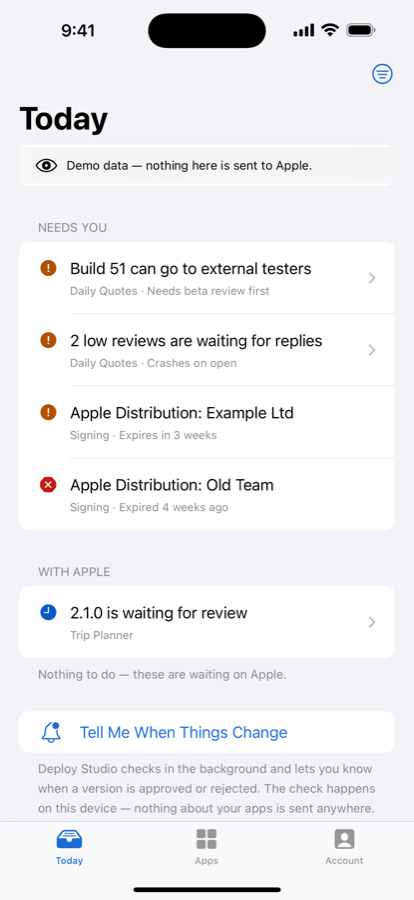
Today Deploy Studio Today screen showing release activity Know what needs attention before you open the laptop.
12
checks before submit
1
clear release flow
0
servers with your key
All
apps, one place

Why it exists

Everything between build and App Review

A release is more than a build. Deploy Studio puts the decisions, checks, and final submission in one calm flow.

The old release routine

  • Create a version
  • Write release notes
  • Pick the build to ship
  • Answer export compliance
  • Submit for review

The Deploy Studio flow

  • Create a version
  • Write release notes
  • Pick the build to ship
  • Answer export compliance
  • Submit for review — with its purchases

What it does

A checklist, not a maze of tabs

One screen per version, listing everything between you and App Review. Each row is a single tap from being fixed.

📋

Twelve rows, one screen

Build, export compliance, release notes, screenshots, store listing, app information, age rating, price, review contact, release option — and the purchases going with it.

💬

A Submit button that explains itself

When it's disabled, it tells you why in the words a person uses: “add at least one screenshot”, not a status enum.

🧾

Version and purchases together

App Review can take a version and its in-app purchases as one submission. Deploy Studio exposes that, so a release and the purchases it depends on go in together.

🔔

It tells you first

A Today screen answering “is there anything I should do” across every app, a notification when a version is approved or rejected, and a Home Screen widget.

📈

After the release

The App Store funnel — impressions, product page views, downloads and the conversion between them. Sales and proceeds. Ratings and reviews you can reply to.

🔧

The things that break a build

Certificates, profiles, devices and bundle IDs, plus TestFlight testers, phased release, sandbox testers, users and Xcode Cloud.

Inside the app

It opens on the answer, not a dashboard

The Today screen summarising what needs attention
Today — anything I should do?
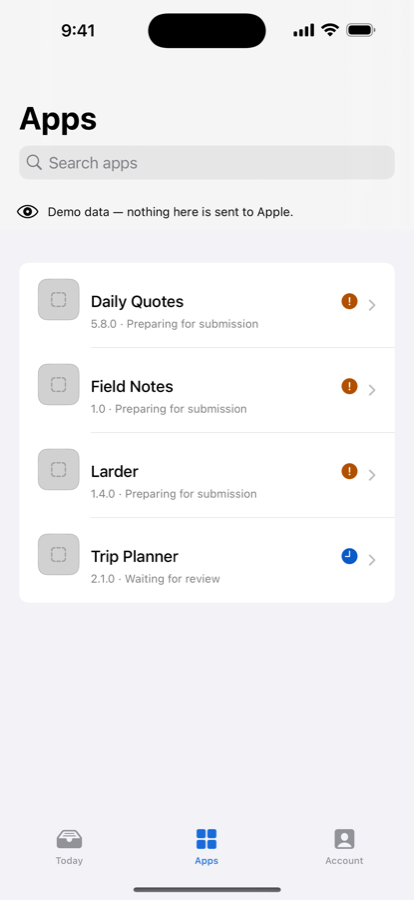
Every app in one list
Every app, one screen
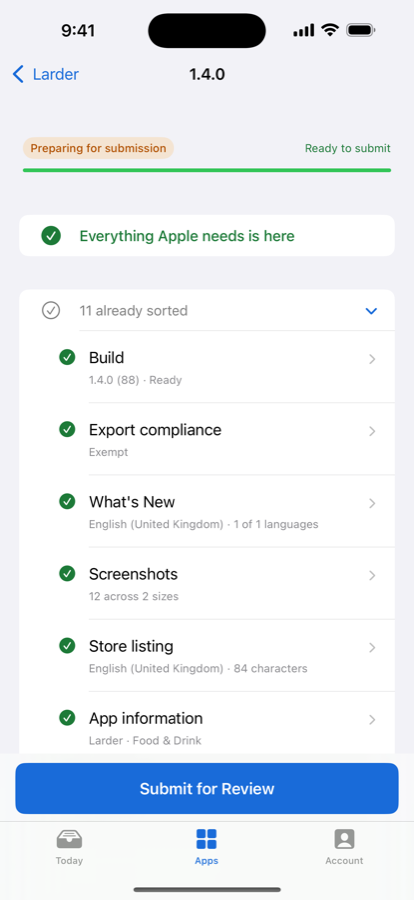
A release checklist with every row satisfied
Everything Apple needs is here
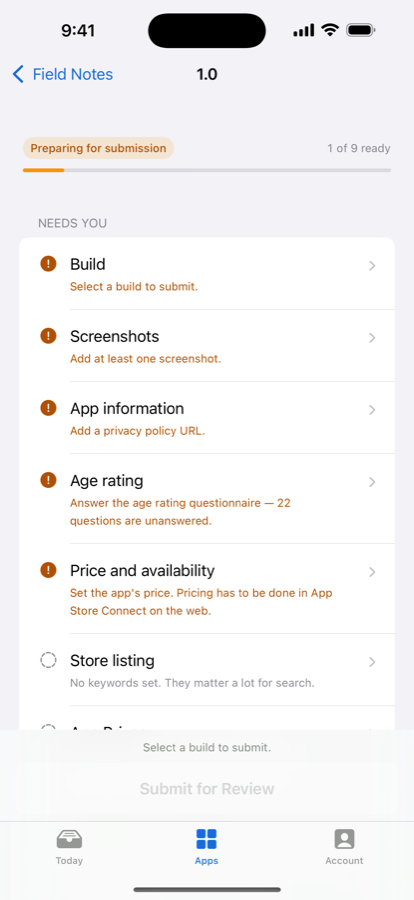
A checklist showing what is still blocking the release
…or exactly what isn't
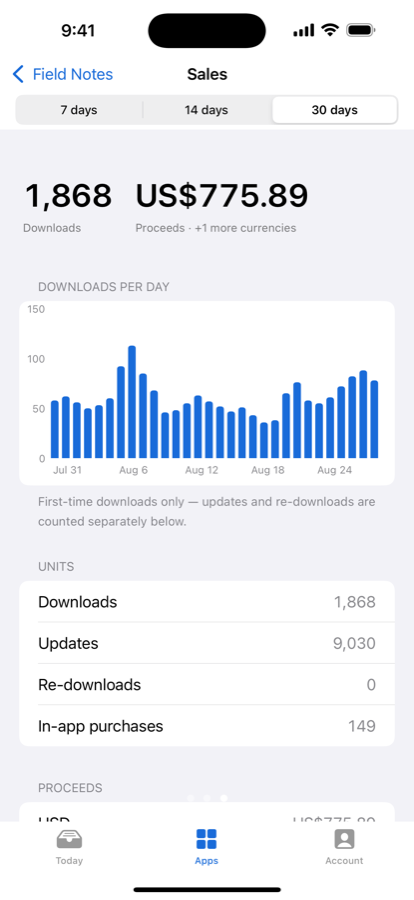
Sales over the last thirty days
Sales and proceeds
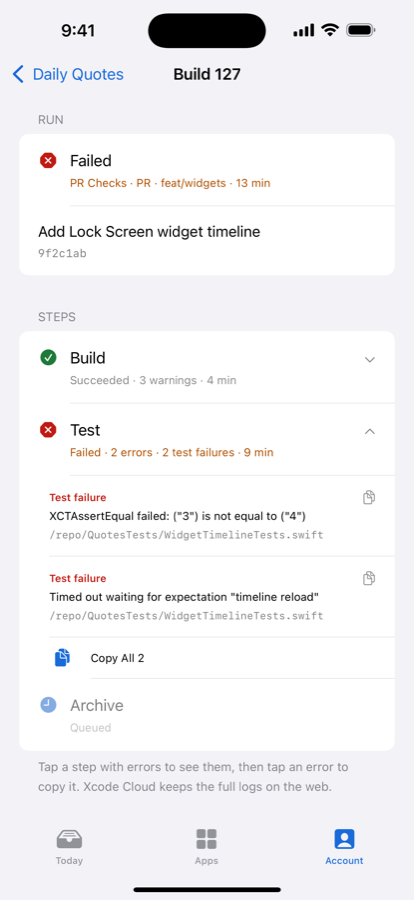
An Xcode Cloud build running
Start a build from anywhere

Try it first

Look around before you hand it a key

Tap Look Around First on the setup screen and the whole app opens against sample data — three example apps with versions, builds, purchases, crash reports, sales and a full release checklist. Nothing is sent anywhere, and a banner says so on every screen.

No sign-upThere is no account system. Nothing to create, nothing to remember.
Your own keyWhen you're ready, create an App Store Connect API key in your account and paste in the .p8.
Face IDLock the app, and the keys inside it, behind Face ID.
Switch teamsAdd more than one key and tap to move between teams.

Your key never leaves the device

The .p8 lives in the device Keychain, locked to this device and never synced to iCloud. Tokens are signed on the device, and the only place they go is api.appstoreconnect.apple.com. There is no server, no account, and no copy of your data anywhere but your phone.

Nothing from your App Store Connect account — app names, bundle identifiers, sales figures, your key — is ever logged. The analytics the app does send are closed lists of screen names and counts, so your data can't end up in one even by mistake.

Pricing

Every feature is free

The purchase removes ads. It doesn't unlock anything — there is no feature behind it.

Free

The whole app

  • Submit a release for review
  • The full twelve-row checklist
  • Sales, funnel, reviews and crashes
  • TestFlight, Xcode Cloud and account settings
  • Notifications and the widget
  • A banner ad at the bottom

Deploy Pro

One payment, no subscription

  • Everything in Free
  • No ads, anywhere
  • No tracking prompt to decline
  • That's the entire difference

Ready when you are

Deploy Studio is approved and available on the App Store. Ship the next release from your iPhone.

Download on the App Store